Building Commercial Software Solo With Claude Code
The structure and decisions behind building a Mac app as a solo founder.


In this article
Update (June 2026): This system has evolved a lot since I wrote this. I’ve published a follow-up on where it stands now, including the parts I changed my mind about: The State of My Solo Claude Code System: June 2026. The post below is the original foundation, and it still holds up as the starting point.
I’ve been building EnviousWispr, a commercial macOS voice-to-text app, entirely by myself using Claude Code. Along the way I made a lot of mistakes, rewrote things I didn’t need to, and lost context between sessions more times than I’d like to admit.
What I’m sharing here is the system I landed on after months of iteration. It’s not the only way to do this, and I’m still learning. But it’s made a real difference in how fast I ship and how few things break when I do. If you’re building something with Claude Code and feeling the friction of scaling a solo project, I hope some of this is useful to you.
The Three Pillars
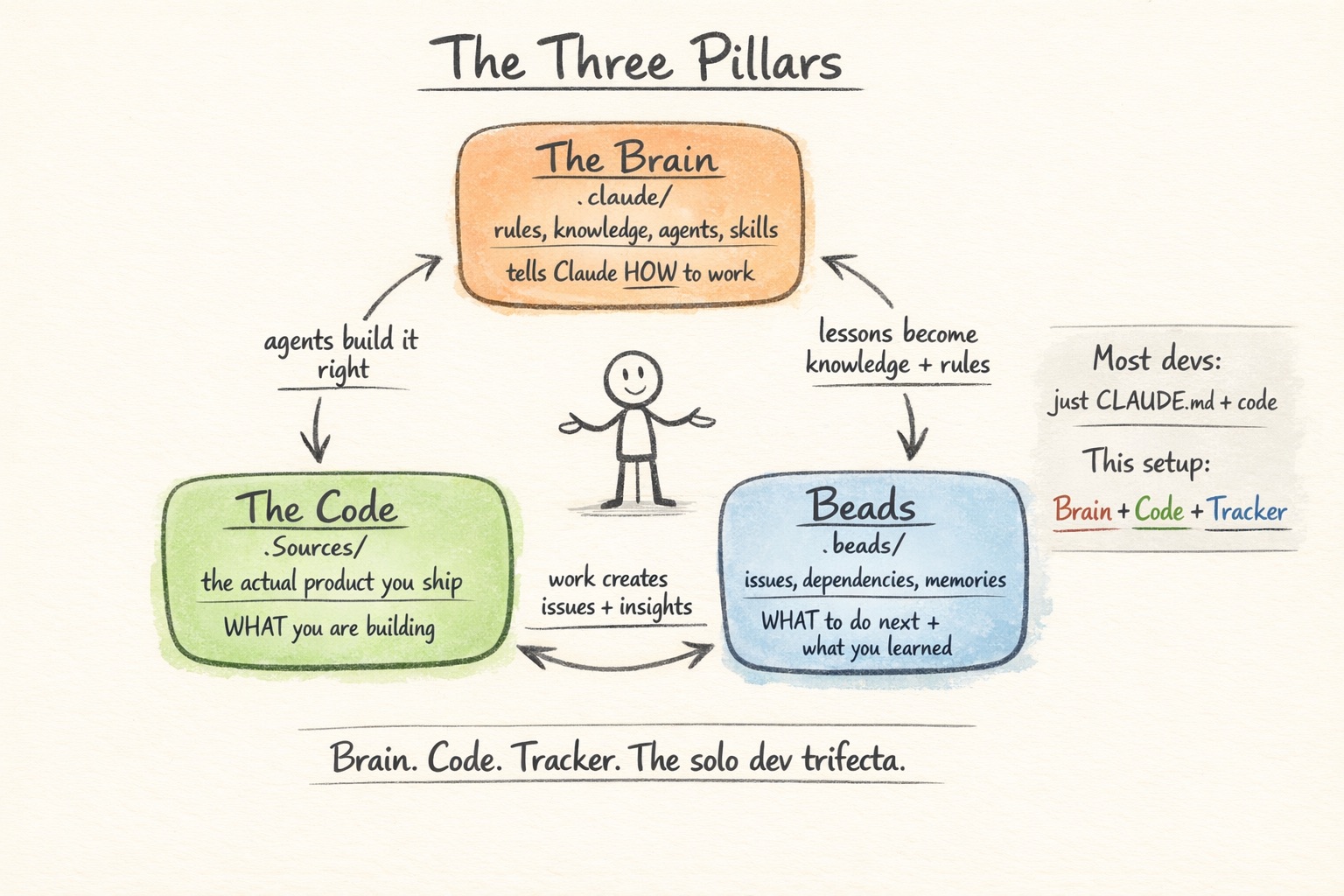
When I started, I had two things: my code and a CLAUDE.md file. That worked fine for the first few weeks. Then the project grew, sessions got longer, and I kept re-explaining the same context. Lessons from last Tuesday’s debugging session were gone by Thursday.
The missing piece was a third pillar. Here’s how I think about it now:
- Brain (
.claude/). This is everything that tells Claude how to work on your project. Process rules, specialist agents, domain knowledge, scoped instructions, quality gates. It’s the institutional knowledge. - Code (
Sources/or whatever your source layout is). This is the actual product you’re building. - Tracker (GitHub Issues, Linear, or any persistent issue system). This is what’s been done and what needs to be done next. It keeps you focused across sessions so nothing falls through the cracks.
The three pillars support each other. Brain tells Claude how to operate. Code gets built. The tracker keeps you oriented on what to work on next and what’s already been shipped. When you learn something new during development, you update Brain directly, which makes the next session better than the last.
Each layer reinforces the others. Let me walk through how each one works in practice.
The Brain: Three-Tier Context Stack
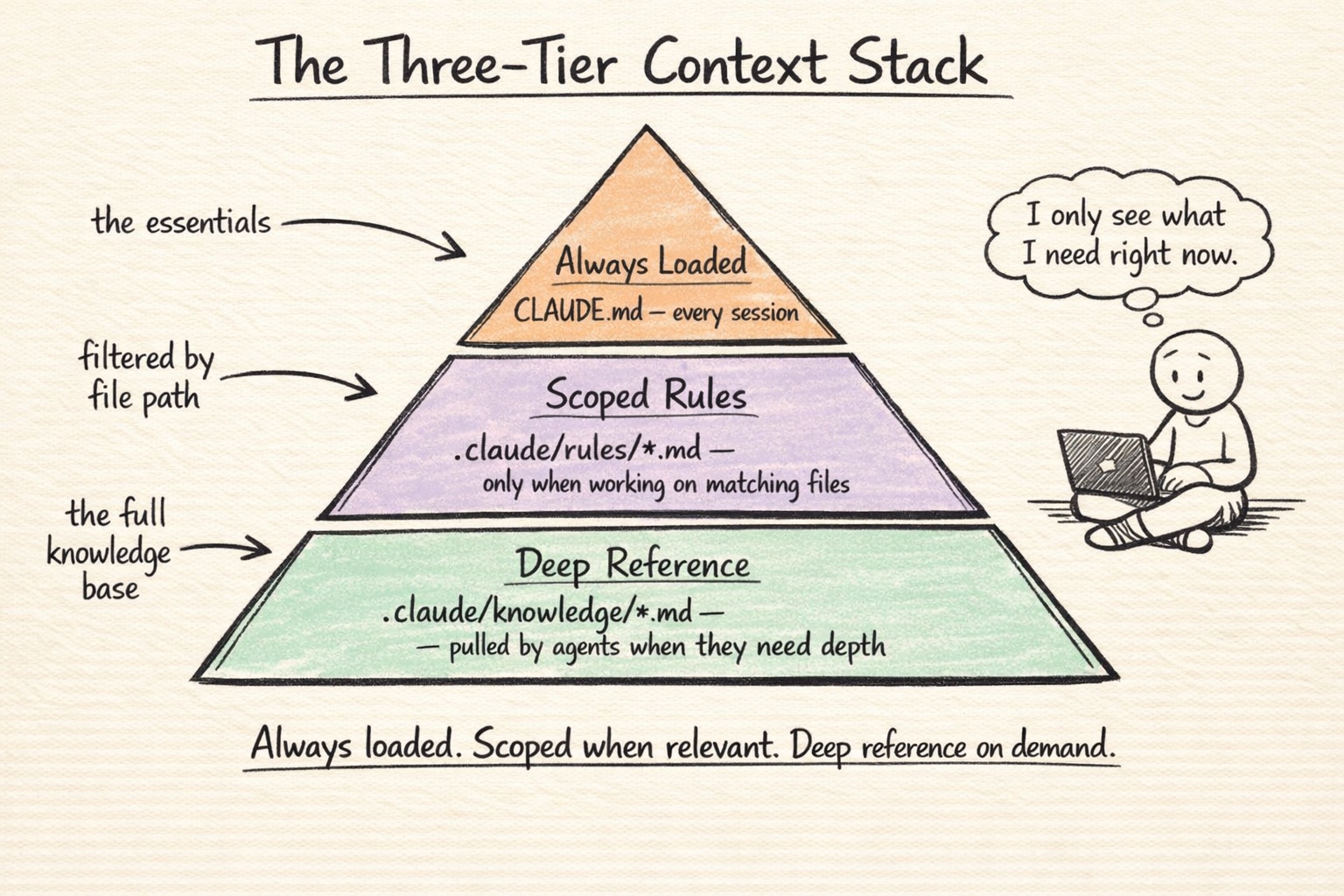
Your .claude/ folder is Claude’s brain. But here’s something I learned the hard way: if you put everything into one CLAUDE.md file, it gets noisy. Claude’s ability to follow instructions actually degrades as the file grows. More context isn’t always better context.
What worked for me is a three-tier system where each layer only loads when it’s needed.
Tier 1: Always loaded (CLAUDE.md)
This is your product identity, your core process rules, and a map of where to find things. I keep mine under 100 lines. It answers the basics: What are we building? What are the build commands? What rules always apply? Where is everything else?
Think of it as the briefing document you’d hand someone on day one. Short, dense, and accurate.
Tier 2: Scoped rules (.claude/rules/ with paths: frontmatter)
This is where I keep architecture rules, language-specific patterns, and known traps. The key feature is the paths: frontmatter at the top of each file. It tells Claude Code to only inject these rules when working on files that match the pattern.
I have a Swift patterns file that only loads when editing .swift files, and an architecture rules file that loads when touching the source modules. When I’m writing a blog post or editing the marketing site, neither of those fires. Claude sees about 146 lines of instructions instead of 400+.
Right context for the right task. This was one of the biggest improvements I made.
Tier 3: Deep reference (.claude/knowledge/)
These are detailed markdown documents. Full architecture notes, dependency guides, pipeline mechanics, release checklists. They’re never auto-loaded. They cost zero context until an agent explicitly reads one.
When an agent needs to understand the audio pipeline before making a change, it reads .claude/knowledge/architecture.md. When it doesn’t need that depth, the document doesn’t exist as far as the context window is concerned.
The Folder Anatomy
Here’s what my actual .claude/ directory looks like after several months of building:
.claude/
├── CLAUDE.md                         # Always loaded: product identity, rules, map
├── settings.json                     # Tool permissions, auto-approve lists
├── rules/                            # paths: frontmatter scopes each file
│   ├── architecture-rules.md         # Module boundaries, heart & limbs: Sources/**
│   └── swift-patterns.md             # Compiler traps + runtime gotchas: Sources/**, scripts/**
├── knowledge/
│   ├── architecture.md               # Full module map, data flow, debt register
│   ├── gotchas.md                    # Every trap we've hit and how to avoid it
│   ├── conventions.md                # Definition of done, code style, naming
│   ├── pipeline-mechanics.md         # Audio to ASR to paste pipeline deep dive
│   ├── distribution.md               # Dependencies, build process, release steps
│   ├── github-workflow.md            # Branch rules, CI, PR conventions
│   └── ... (7 more)
├── agents/
│   ├── build-compile.md              # Keeps it buildable: compiler errors, deps
│   ├── audio-pipeline.md             # Mic to transcript: AVFoundation, ASR
│   ├── wispr-eyes.md                 # Sees the running app via accessibility APIs
│   └── ... (9 more)
└── skills/
    ├── wispr-rebuild-and-relaunch/   # Full release build + bundle + relaunch
    ├── wispr-run-smoke-test/         # Fast compile gate
    ├── wispr-eyes/                   # AI visual verification of the running app
    └── ... (17 more)
The numbers today: 2 scoped rule files, 13 knowledge files (about 130KB total), 12 specialist agents, 20 skills. I didn’t build all of this upfront. It grew as the project did, one piece at a time.
The Ship-It Loop
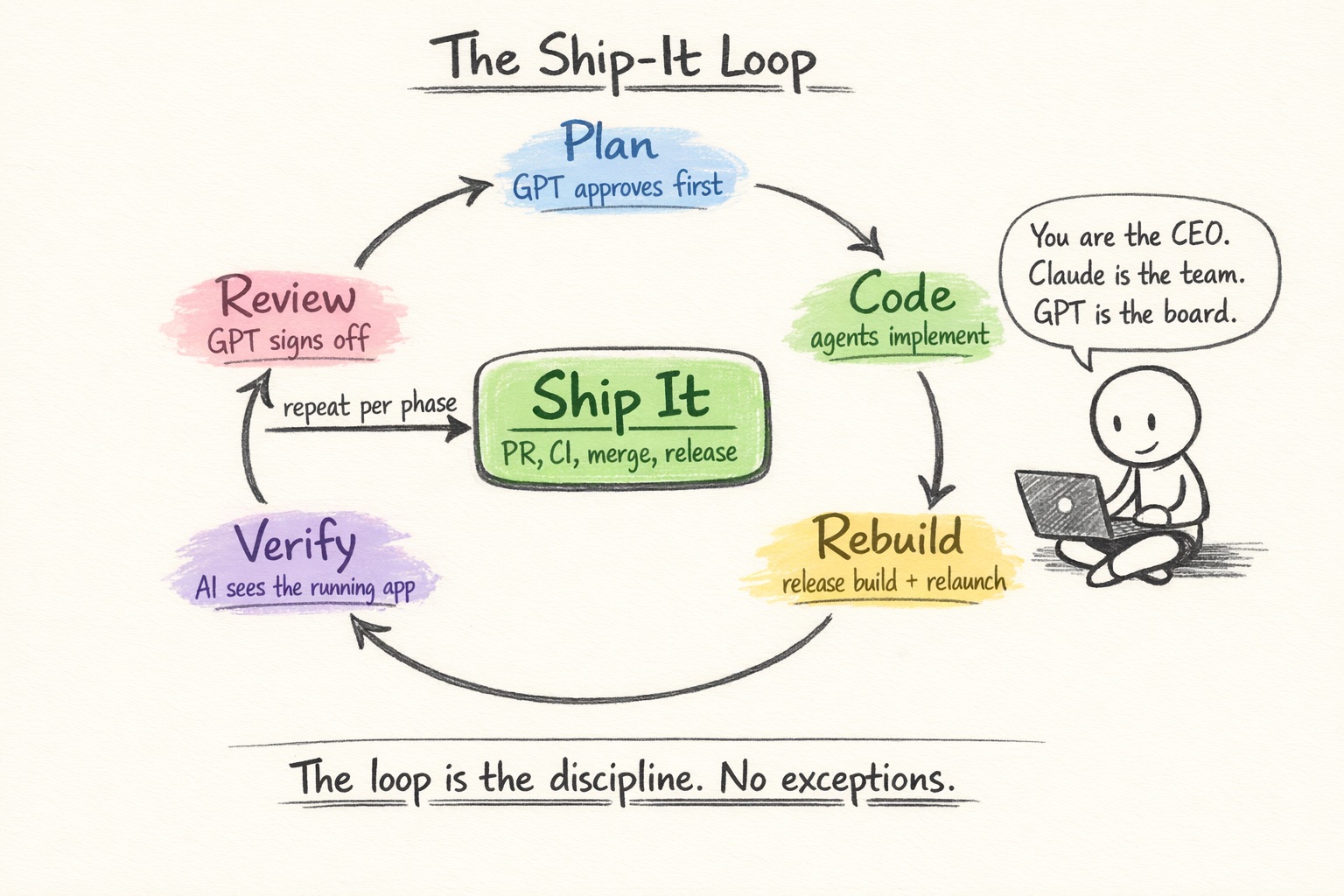
This is the workflow I follow for every code change. Having a consistent loop has been one of the most valuable things for maintaining quality as a solo developer.
1. Plan: get a second opinion first
Before any code gets written, I share the plan with a second AI (I use GPT Desktop) for review. Not because Claude is bad at planning, but because the same model that designs the solution is also the one that’s about to implement it. A fresh perspective catches things. This step alone has saved me from at least three expensive rewrites.
2. Code: agents implement
Once the plan looks good, specialist agents do the work. The audio pipeline agent handles anything touching AVFoundation. The build agent diagnoses compilation failures. Each one brings focused domain knowledge without needing a massive monolithic context.
3. Rebuild: run the real thing
Not a quick debug build. A full release build, bundled into the .app, relaunched with fresh permissions. I learned early on that bugs can hide in release mode that don’t show up in debug. Running the real thing every time catches those.
4. Verify: AI inspects the running app
A verification skill uses macOS accessibility APIs to inspect the actual running app and confirm the change works as intended. This isn’t checking logs or build output. It’s checking what a user would actually see.
5. Review: second opinion again
The implemented code goes back for review. It checks the diff against the approved plan and either signs off or asks for changes. When both gates pass, the work is ready.
Ship It sits in the center of the loop. It’s the exit point you reach when the full cycle is satisfied. For multi-phase work, I repeat the loop for each phase.
The way I think about it: I’m the CEO. Claude is the engineering team. GPT is the board of advisors.
Rules I Build By
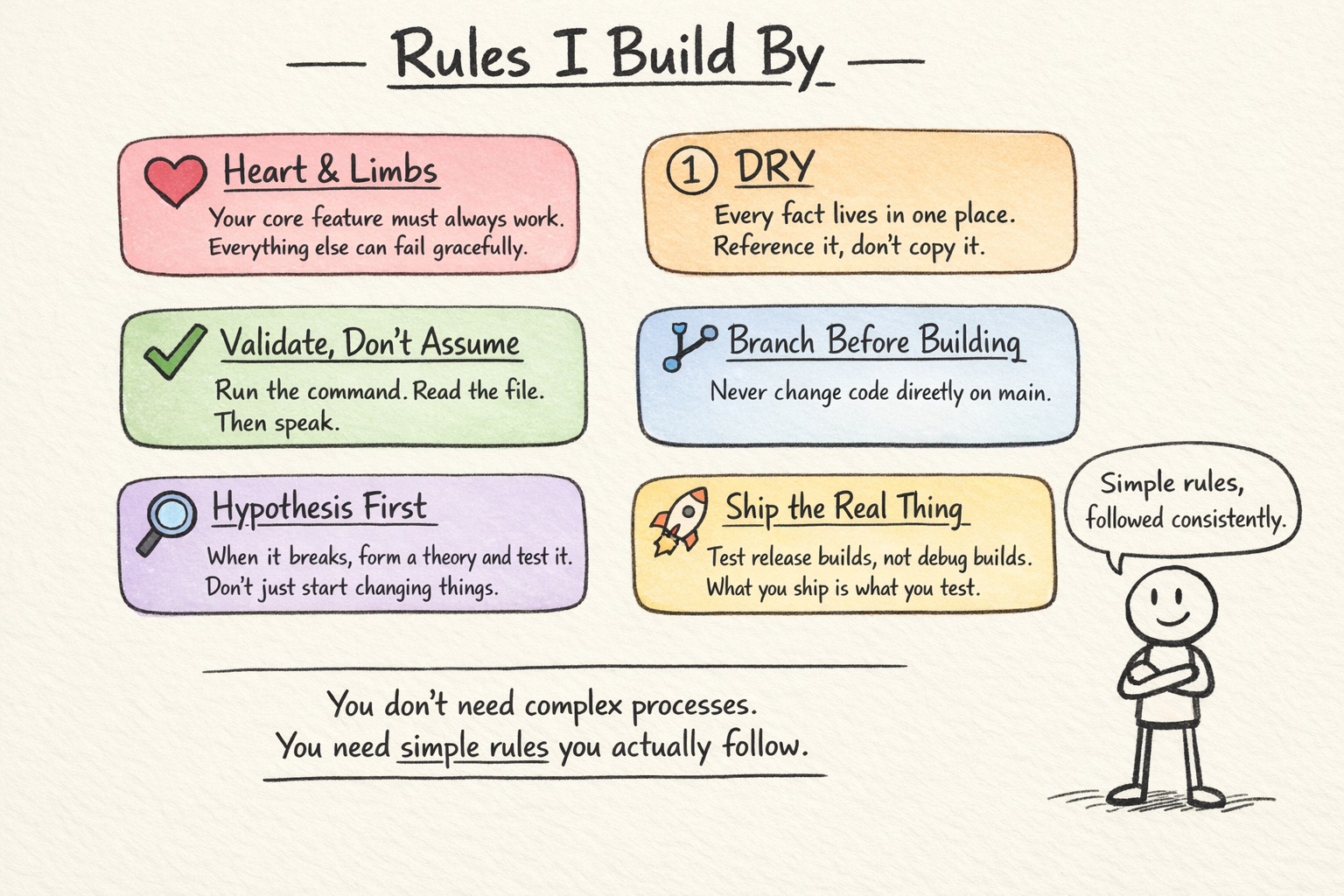
You don’t need a 50-page engineering handbook. You need a handful of simple rules that you actually follow. These are the ones that have made the biggest difference for me:
Heart & Limbs. Your core feature must always work. Everything else, all the nice-to-have extras, can fail gracefully without taking down the main experience. When I’m building a voice-to-text app, the path from “press the button” to “text appears” is the heart. AI polish, custom word replacement, filler removal? Those are limbs. If a limb fails, the heart keeps beating and the user still gets their text.
DRY. Every fact lives in exactly one place. If your build command is documented in CLAUDE.md, don’t also put it in a knowledge file. Reference it, don’t copy it. Duplication is how things drift out of sync.
Validate, don’t assume. Before telling someone (or yourself) that something works, run the command. Read the file. Test the path. This one sounds obvious but it’s the rule I break most often when I’m moving fast.
Branch before building. Never make changes directly on your main branch. Create a branch, do the work, then merge it back. This gives you a clean undo button if things go sideways.
Hypothesis first. When something breaks, resist the urge to just start changing things. Form a theory about what’s wrong, design a test to prove or disprove it, then fix based on evidence. This saves hours of chasing the wrong problem.
Ship the real thing. Always test the actual release build, not the quick debug version. Bugs hide in release mode that don’t show up during development. If you only test debug builds, you’ll ship problems to your users that you’ve never seen yourself.
I keep these in my CLAUDE.md and Claude follows them automatically. They’re not complex. They’re just consistent.
Nothing Learned Is Ever Lost
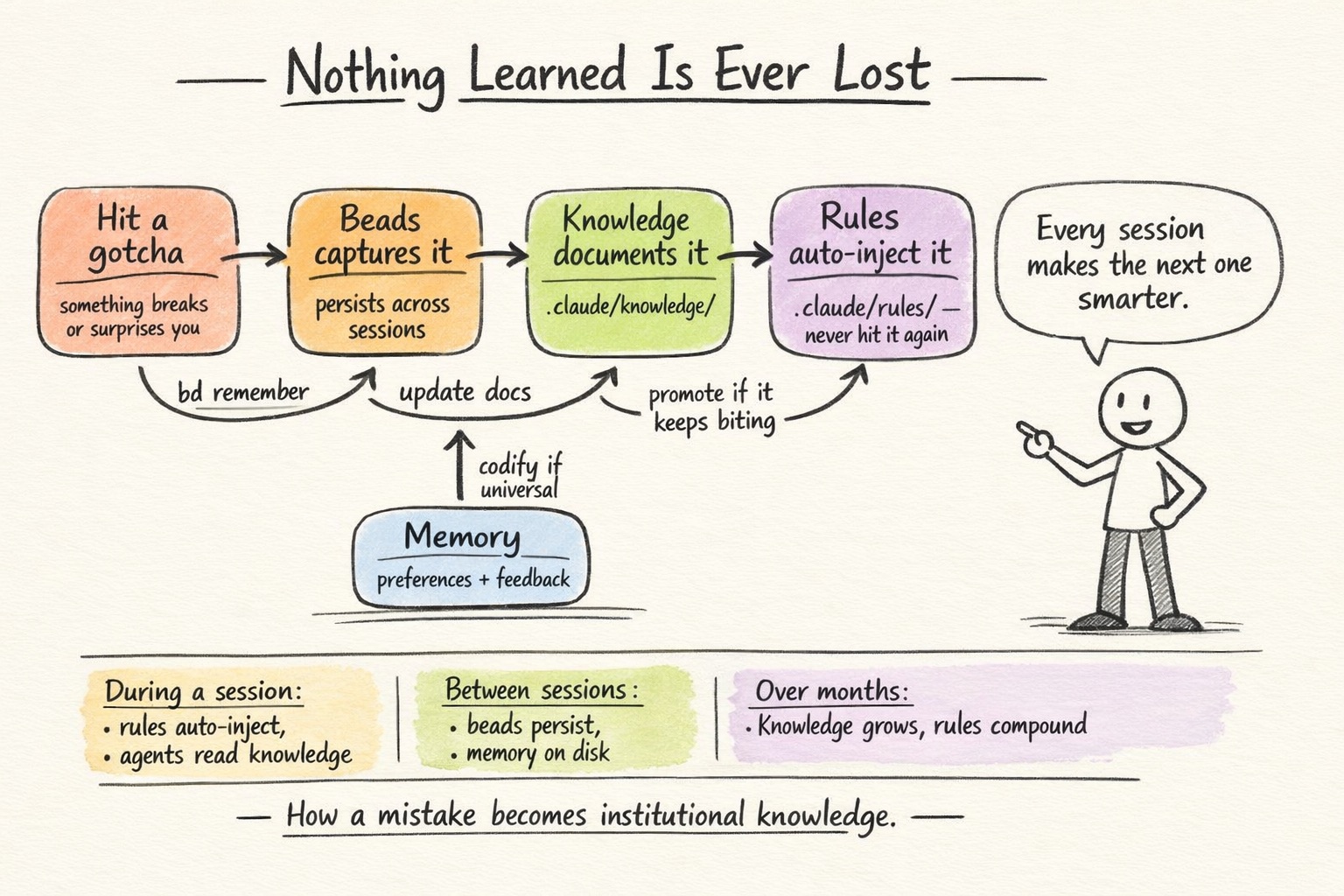
As vibe coders, most of us aren’t coming from a traditional software engineering background. We don’t always know the “right” way to do things. But Claude does notice patterns. It notices when you make the same mistake twice. It notices when something breaks for the same reason it broke last week.
Early on, I started using Claude’s built-in memory to save these lessons. “The app crashes on launch if this framework isn’t copied into the bundle.” “This build command works in debug but fails in release mode.” Small things, but things I kept running into.
Over time, those memories naturally grew into something more structured. The ones that came up constantly got written into knowledge files. The ones that came up every single session got promoted into scoped rules that auto-inject whenever Claude is working in the relevant part of the codebase. I didn’t plan the three-tier system from the start. It emerged from just writing things down when they bit me.
That’s actually the best part. You don’t need to design this upfront. Start by saving memories. When a memory keeps being relevant, move it to a knowledge file. When a knowledge file has a pattern that Claude should always follow, promote it to a scoped rule. The system grows from the bottom up.
After several months on EnviousWispr: 88 persistent memories, 13 knowledge files, 2 scoped rule files. Each layer built on the one before it.
Getting Started
You don’t need to build all of this by hand. Here’s a prompt you can paste directly into Claude Code that will scaffold the entire system for your project:
Analyze this project and set up a three-tier context system:

1. Create a CLAUDE.md (under 200 lines) with:
   - What this project is and who it's for
   - Build, test, and run commands
   - Core rules that always apply
   - Pointers to .claude/knowledge/ and .claude/rules/

2. Create .claude/knowledge/gotchas.md
   - Scan the codebase for non-obvious patterns
   - Document any traps, quirks, or gotchas you can find
   - Include workarounds for each one

3. Create .claude/rules/ with path-scoped rule files
   - One file per language or domain (e.g. python-patterns.md, react-patterns.md)
   - Add paths: frontmatter so they only load for matching files
   - Include the top patterns and traps for that area

4. Create .claude/knowledge/architecture.md
   - Document the directory structure
   - Map out how the main modules connect
   - Note any non-obvious dependencies

5. Add these building principles to CLAUDE.md:
   - Heart & Limbs: the core feature must always work, everything else
     can fail gracefully without breaking the main experience
   - DRY: every fact lives in one place, reference don't copy
   - Validate don't assume: run the command, read the file, then speak
   - Branch before building: never change code directly on main
   - Hypothesis first: when something breaks, form a theory and test it
     before changing anything
   - Ship the real thing: always test release builds, not debug builds

Keep everything concise. Dense is better than verbose.
That one prompt will get you about 80% of the way there. From that foundation, the system grows naturally as you work. Every time something surprises you, add it to the gotchas file. Every time you find yourself repeating the same instruction to Claude, that’s a candidate for a scoped rule.
The tracker piece is separate. Pick whatever works for you: GitHub Issues, Linear, Notion, even a markdown file in the repo. The only requirement is that it persists across sessions so you can always answer “what should I work on next?”
Wrapping Up
This is what’s working for me. Your project is different, your stack is different, and you’ll find your own patterns. The core idea is simple: give Claude a real brain, track your work so nothing falls through the cracks, and follow a consistent loop so quality stays high even when you’re moving fast.
I’d love to hear what’s working for you. If you’re building something with Claude Code and have found patterns that help, I’m genuinely interested. We’re all figuring this out together.
Curious about EnviousWispr the product Claude and I shipped together? See how it works or browse comparisons against other Mac dictation tools.