EnviousWispr

Talk naturally.
Capture perfectly.

Free, private AI dictation for macOS.

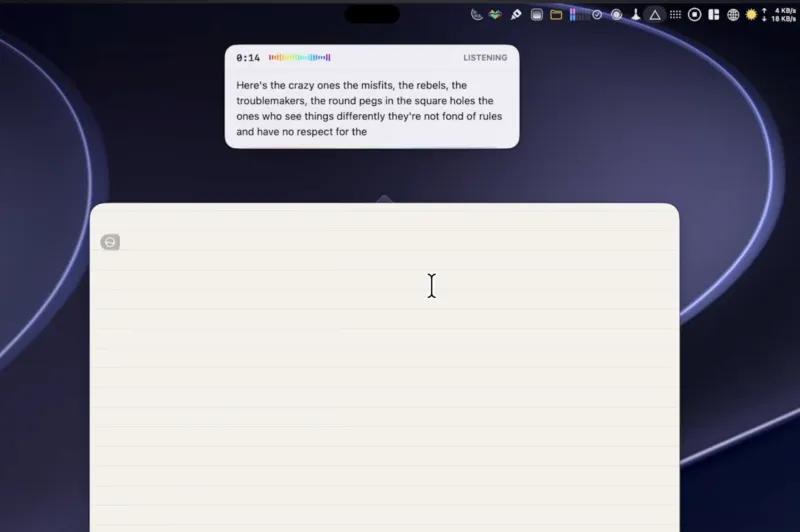
Turn spoken thoughts into polished text in the apps you use. Your voice stays on your Mac, with offline AI polish.

Download free for Mac

Free and open source.No account. No subscription.

macOS 14+ · Apple Silicon (M1 or later)

New Message −  ↗  ×
ToMaya  ×
Friday’s planning meeting

Hi Maya,

For Friday, please bring: • The design notes • The launch checklist • The revised budget of $6,239

Thanks, Amira

  1. Speak
  2. Polish
  3. Paste

How it works

How EnviousWispr turns speech into
polished text in your Mac apps.

A look behind the scenes at our native macOS speech-to-text pipeline. Five stages prepare your audio, clean up verbal clutter, and deliver polished writing at your cursor, with on-device transcription and your choice of local or cloud AI polish.

  1. 1

    Smart audio trimming

    On your Mac

    Prepares the recording, trimming silence when appropriate.

  2. 2

    Local speech-to-text transcription

    On your Mac

    Your chosen speech engine turns the recording into text on your Mac.

  3. 3

    Custom vocabulary & formatting

    On your Mac

    Snippets, custom words, fillers, emoji and number formatting, using your settings.

  4. 4

    Local & cloud AI polishing

    Your choice

    Your chosen AI model tidies the cleaned text, locally or through your chosen provider.

  5. 5

    Direct text insertion & paste

    On your Mac

    Finished text goes into your app, with clipboard fallback when needed.

Your dictation audio never leaves your Mac.

Choose local polish to keep the text there too. With a cloud provider, text goes directly to that provider under your own key. Envious Labs does not receive your dictation.

Your Mac.
Your choice.

Local speech engines

Two native speech engines.
Fast by default. More languages when you need them.

Both engines run locally on Apple Silicon, so your audio stays on your Mac. Choose fast everyday dictation with Parakeet or wider language coverage with WhisperKit.

Swipe to compare engines

Recommended starting point

Parakeet

Fast on-device dictation for everyday writing. Downloaded during setup, ready for your first dictation.

Parakeet v3
EnglishEnglishAutomatic mode
send the notes before our meeting thanks

Send the notes before our meeting, thanks.

Pasted ✓
Best for
Everyday speed
Languages
25 European
Processing
100% on your Mac
Setup
Downloaded during setup
99+ languages

WhisperKit

Whisper optimized for Apple Silicon, with broader language coverage including Hindi, Japanese and Arabic.

Whisper Large v3 Turbo
日本語JapaneseAutomatic mode
会議の前にメモを送ってください ありがとう

会議の前にメモを送ってください。ありがとう。

Pasted ✓
Best for
Broader language coverage
Languages
99+
Processing
100% on your Mac
Download
About 1.64 GB on demand
Not sure which to pick? Start with Parakeet.

It’s the default for everyday dictation. Switch engines anytime in Settings → Transcription.

Which engine fits your setup? ↗

Provider choice

Choose where your
AI polish runs.

Keep text on your Mac with a local model, or use your provider account for cloud polish. Requests go directly to your provider, with no EnviousWispr token markup or subscription.

Swipe to see both setups

On-device models

Local processing. Your audio and text stay on your Mac.

Apple Intelligence
On your Mac. Requires macOS 26+ with Apple Intelligence enabled and available.
EG-1
Our dictation model for punctuation and natural cleanup. About 2.9 GB.
S1-mini
Compact English-language polish by Superwhisper. About 484 MB.
Local Ollama
Offline cleanup with a compatible model installed through Ollama.

Cloud models (BYOK)

Your provider account or API key. No EnviousWispr markup or subscription. Provider charges may apply.

OpenAI
Choose an available OpenAI model with your API key. Text goes directly to OpenAI.
Anthropic Claude
Polish with a Claude model under your own Anthropic API key.
Google Gemini
Connect your Gemini API key for cleanup and formatting. Text goes directly to Google.
Hosted Ollama
Use your Ollama account to choose a hosted model. Text is processed on Ollama’s servers.

The cleanup engine

Built to handle nuances, stumbles, and everyday formatting.

Real speech is full of pauses, false starts, corrections, and spoken lists. See how local cleanup and AI polish turn your words into clear, structured text.

Why basic dictation falls short ↗

1 of 12

Swipe for more examples

What each one means

Keeps your language

Speak Spanish, get Spanish. Polish is set up only to tidy your words, not to translate them.

Ignores commands

Dictation is treated as text to write. The polish prompt tells the model not to follow instructions inside it.

Catches runaway text

Output checks can reject empty, repetitive or unusually long results and keep the cleaned transcript instead.

A fallback if polish fails

If AI polish fails or times out, EnviousWispr falls back to the last successful text.

For your day

See yourself using EnviousWispr.

From code to email to study notes. Speak directly into the apps you already use.

1 / 9
Explore more ways to use dictation ↗

Real results

Real people. Real results.

Independent reviews, public conversations and press coverage. Read or watch the originals and make up your own mind.

Swipe for more

u/No-Object1384r/macapps
“I’m really genuinely impressed so far in using it (I wrote most of this comment with it), and the fact that this is free is surprising.”
Read the conversation ↗

Comparisons

See how we stack up.

Built-in dictation or a paid alternative? Explore the differences in cleanup, privacy, features and cost.

Swipe to compare

EnviousWispr

Free

Dictation and local AI polish.

Audio
On your MacYour audio stays on-device.
Text cleanup
Local AI includedOptional cloud providers with your own key.
Getting started
No accountDownload and choose your setup.
Try EnviousWispr
Sources: Features

Apple Dictation

Included

Built into macOS.

Audio
On-device or serverDepends on language and settings.
Text cleanup
Separate Writing ToolsRequires a supported Apple Intelligence setup.
Getting started
Enable in settingsSystem Settings → Keyboard.
Full comparison ↗

Wispr Flow

Free + Pro

Free: 2,000 words/week on desktop. Pro: $15/month.

Audio
Cloud transcriptionInternet connection required.
Text cleanup
Automatic cleanupPart of its cloud-connected dictation workflow.
Getting started
Sign inAccount-based setup.
Full comparison ↗
Sources: Pricing · Privacy · Setup

Superwhisper

Free + Pro

Free unlimited Whisper models. Pro adds AI models.

Audio
Local or cloudChoose a voice model.
Text cleanup
Local AI in ProLocal or cloud language models.
Getting started
Offline without an accountPaid/cloud setup can differ.
Full comparison ↗
Sources: Plans · Offline mode
Explore all comparisons ↗

A personal thank-you

More than a
personal project.

This started with my own typing bottleneck and a small project I wanted to use myself. It has now grown to thousands of downloads, and that means more to me than I expected.

Thank you to everyone who has tried EnviousWispr, reported a problem, suggested an improvement or shared it with a friend. Your feedback and continued support keep shaping the app.

I use it every day. I hope it gives you more room to think, create and get on with your day.

Saurabh Founder, Envious Labs

A little more room for your ideas.

Put your voice to work.

Free dictation and AI polish, on your Mac. No account. No subscription.

Download for MacmacOS 14+ · Apple Silicon
Prefer Homebrew?
brew install --cask saurabhav88/tap/enviouswispr