

EnviousWispr

Compare Mac dictation apps

Compare the apps.
Find your fit.

Where your voice goes. How your words are cleaned up. What you pay. See the differences before you choose.

Try EnviousWispr freemacOS 14+ · Apple Silicon · No account

The essentials.

All 17 comparisons

Swipe across for apps and scroll down for features. Names stay in view.

Five Mac dictation options compared by cost, privacy, setup and everyday use. Details checked 12 September 2026.
Find what
matters to you.
EnviousWisprFree, private dictationWispr FlowCloud dictationSuperwhisperModel and mode choiceFluidVoiceFree, configurable dictationSpokenlyLocal and cloud flexibility
Cost & setup
PriceFreeDictation, file transcription and local AI polish.Free + Pro2,000 words/week on desktop. Pro $15/month, or $12/month billed annually.Free + ProUnlimited Whisper models free. Pro $8.49/month; annual and lifetime options.FreeLocal dictation and Fluid Intelligence. Cloud provider fees may apply.Free + ProLocal models free. Pro $99.99/year ($8.33/month), billed annually.
Getting startedNo accountInstall the app and download your models.Sign inAn account and internet connection.Choose a modelNo account needed for offline transcription.Choose your setupGrant permissions, set a shortcut and choose your models.No account for local useInstall local models. Pro activation depends on purchase source.
Privacy & processing
Where audio goesStays on your MacTranscription always runs on-device.CloudAudio is sent for cloud transcription.Local or cloudDepends on the voice model you choose.Local-firstVoice and text stay local unless you opt into a cloud AI provider.Local or cloudLocal models keep audio on-device. Cloud models send it to a provider.
Works offlineYesAfter setup, with local transcription and polish models.Internet requiredCloud-connected dictation.With local modelsDownload the models first.With local modelsDownload speech and Fluid Intelligence models first.With local modelsLocal Only Mode blocks external network access.
AI text cleanupLocal AI includedCloud polish also available with your own provider.¹Automatic, in cloudCleanup is part of the dictation workflow.Local or cloud AIPro includes local and cloud language models.Local AI includedFluid Intelligence, or a cloud provider you choose.Local or cloud AIApple Intelligence on supported Macs; cloud via your key or Pro.
Everyday use
WorkflowDictate & transcribe filesDictation into your apps, plus recordings you import.Dictation across devicesMac, Windows, iOS and Android.Configurable dictationVoice models, custom prompts and modes.Dictation & voice actionsConfigurable speech models, Write Mode and Command Mode.Dictation across devicesMac, Windows, Linux and iOS. Per-mode prompts and models.
Languages99+ with WhisperKitParakeet covers 25 European languages.100+Language support varies by feature.100+Model-dependent language support.99 with WhisperModel-dependent; Parakeet v3 covers 25 languages.100+Model-dependent language support.
On Apple SiliconM1 or latermacOS 14+. Intel Macs are not supported.SupportedSpeech processing runs in the cloud.SupportedRecommended for offline models.SupportedmacOS 15+. Intel support through Whisper models.SupportedmacOS 13.3+. Local model support varies on Intel.
App source codeOpen sourceGPLv3. AI models have their own licenses.ProprietaryProprietaryOpen-source appGPLv3. Fluid Intelligence is a separate, private runtime.Proprietary
Explore furtherOur features Full comparison Full comparison Full comparison Full comparison

¹ Local or cloud, your choice. EnviousWispr keeps audio on your Mac. If you choose cloud polish, selected text and cleanup context go directly to your provider. Providers may charge for usage. Apple Intelligence polish requires macOS 26+ and availability.

Checked 12 September 2026. Prices are in the currencies shown; taxes and regional pricing may vary. Features can depend on your plan, model and setup. See primary sources ↓

The trade-offs

A good fit beats
the longest feature list.

Choose EnviousWispr for free, private dictation.

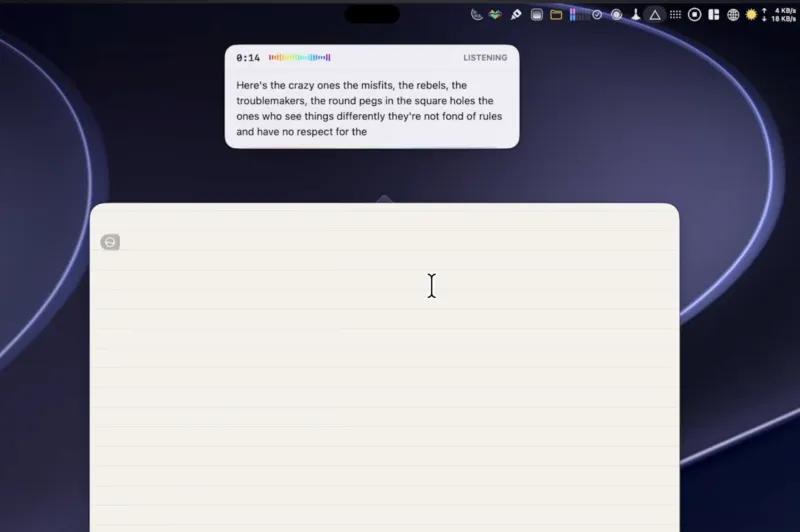
Dictate into your apps, transcribe a recording, and clean up the text with local AI. No account or subscription. Your audio stays on your Mac.

The trade-off: you need Apple Silicon and macOS 14+. If cross-platform access or a broader team workflow matters more, look at those capabilities first.

See how offline works

Another app may fit you better.

Across devices and teams
Wispr Flow offers a broader cloud service with cross-platform dictation and team features.
More model and mode control
Superwhisper offers configurable voice models, prompts and writing modes.
Free dictation with voice actions
FluidVoice combines local AI cleanup with configurable speech models, Write Mode and Command Mode.
Local and cloud across devices
Spokenly offers free local transcription, your own provider keys and a paid cloud plan, with configurable dictation modes.

See the results

A feature list is
half the story.

How does the text actually turn out? Mostly Mac compared seven dictation apps using the same passages. Watch the examples and the reviewer’s conclusions.

Watch the independent comparison This is one reviewer’s test, not a guarantee for every voice, language or Mac.
Mostly Mac demonstrating EnviousWispr in a comparison of dictation appsMostly Mac EnviousWispr segment · 6:25 ↗

Take a closer look

Your shortlist.
The full picture.

EnviousWispr alongside 17 dictation, transcription and developer tools.

Check the sources.

Table checked 12 September 2026

This comparison is published by Envious Labs, the maker of EnviousWispr. Product facts come from the sources below. Our fit recommendations are editorial judgments.

A little more room for your ideas.

Make room for your words.

Free, private dictation for Mac. No account. No subscription.

Download for MacmacOS 14+ · Apple Silicon