

Capsule. A small capsule with the rainbow mark and a timer. The pill EnviousWispr has always shown.
Level Rail. A wider capsule with a live rainbow meter of your voice beside the timer.
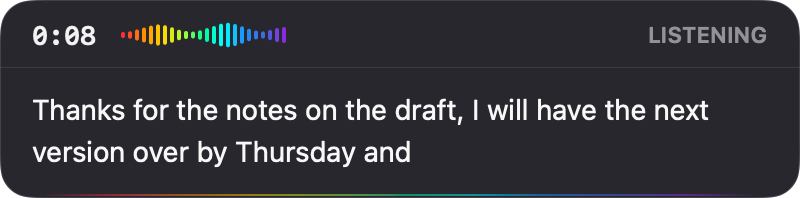
Reading Well. A wide panel that shows your words as you speak, growing a line at a time. Needs Live Preview switched on.
Hear when it starts.
Know when it’s done.
A short sound when recording starts, and another when it stops, so you know it heard you without looking up. Twelve pairings, from barely there to a clear glint. Pick the one you like, or keep it quiet.
Whisper Tick plays unless you change it. Switch sounds off in Settings, Sounds.Twelve real pairings from the app, each with its own start and stop. Tap one to hear both.
Option, on its own. The right one is how EnviousWispr arrives.
Any key can be
your record key.
A key on its own, a key with modifiers, or the Globe key. Pick the one your hand already rests on, hold it, and talk. Tap a key to see it take the job.
The right Option key is the default. Change it in Settings, Keybinds. Cancel (Escape) and Add a word (Control Shift W) have keybinds of their own on the same page.

Make dictation feel like yours.
Free, private dictation for Mac. No account. No subscription.
Download for MacmacOS 14+ · Apple Silicon