The State of My Solo Claude Code System: June 2026
A look inside the systems behind building EnviousWispr.

In this article
This post is a continuation of Building Commercial Software Solo With Claude Code. That post lays out the foundational ideas: the three pillars, the tiered context system, and the rules I build by. This is where the system stands now, a few months and a lot of lessons later.
A few months ago I wrote about how I build EnviousWispr, a commercial macOS voice-to-text app, entirely by myself with Claude Code. That post still gets read and shared, and I am grateful for it. But it was a snapshot of a system from March, and the system has moved a long way since then.
This is the current state, as of June 2026. The foundation is the same: give Claude a real brain, track every piece of work somewhere permanent, and run a consistent loop so quality holds even when I am moving fast. What changed is how serious each of those became, and two things I had to walk back completely.
If you are building something solo with Claude Code, I hope the updated version saves you some of the detours I took.
The three pillars, still standing
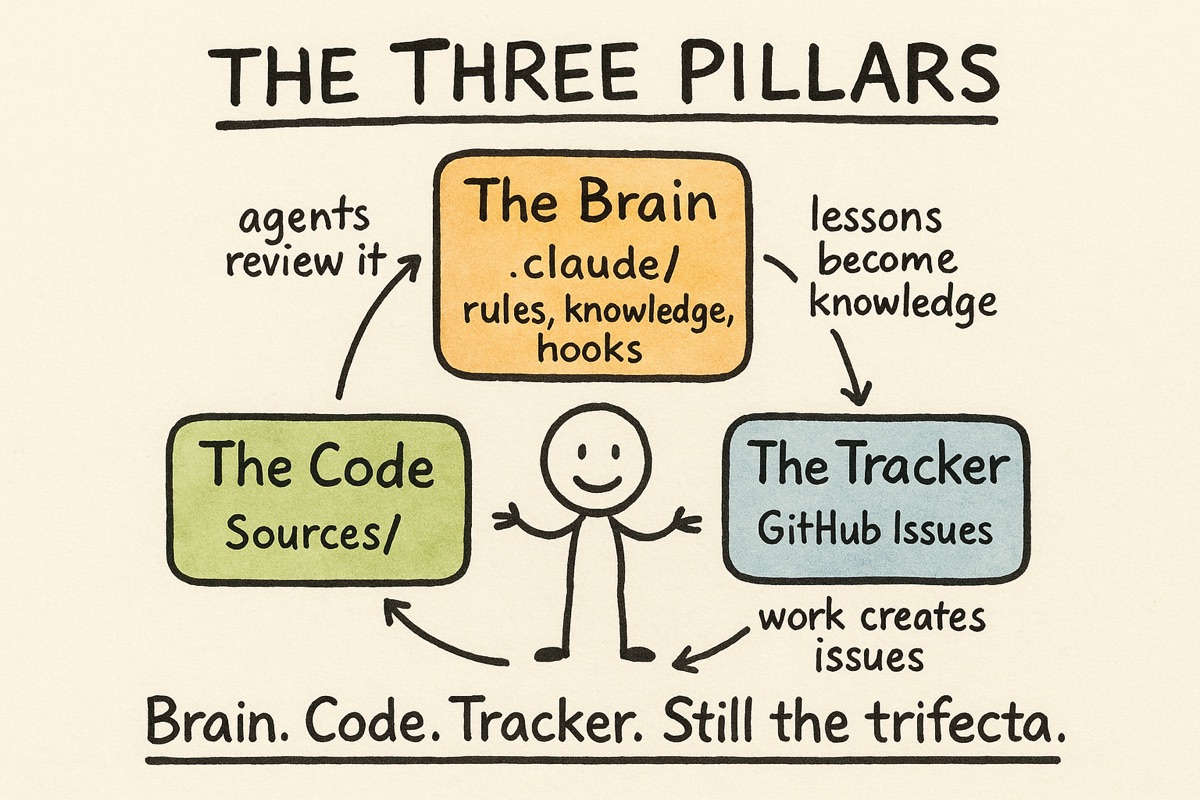
The shape has not changed. Three pillars hold the whole thing up:
- Brain (the
.claude/folder). Everything that tells Claude how to work on my project: process rules, domain knowledge, quality gates, and specialist helpers. - Code (
Sources/). The actual product I am shipping. - Tracker (GitHub Issues). Every task, bug, and decision, written down somewhere that survives across sessions.
What changed is the third pillar. In the original post it was a dedicated tool called Beads. I will get to why that is now GitHub later, because the reason taught me something bigger. But the trifecta itself, brain plus code plus tracker, is exactly as load-bearing as it was. Each one feeds the others. The brain tells Claude how to operate, the work produces code, and the tracker keeps me oriented on what is next. When I learn something, it goes back into the brain so the next session starts smarter than the last.
Tiered documentation: the brain in three layers
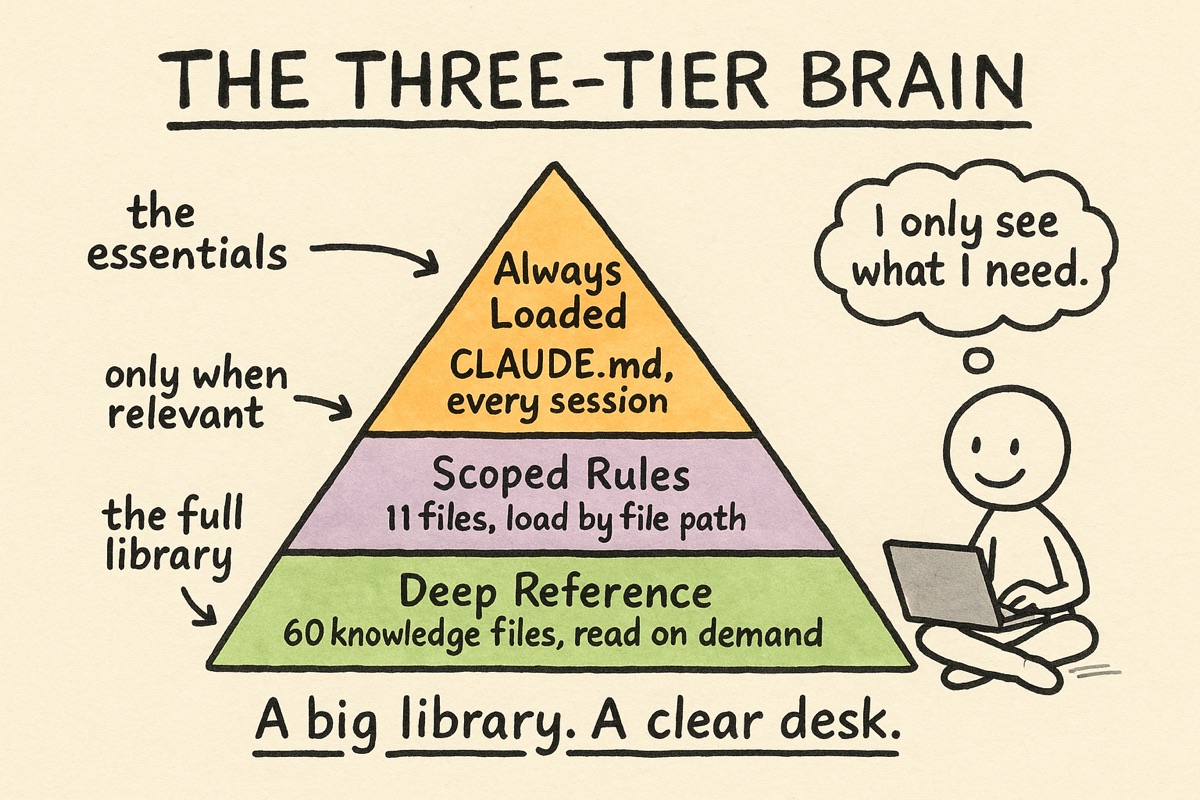
The single most important idea, the one I would keep if I could keep only one, is that the brain is tiered. You do not pour everything into one giant CLAUDE.md. Claude’s ability to follow instructions actually degrades as that file grows, so more context makes things worse, not better.
So the brain loads in three layers:
- Tier 1, always loaded. A short
CLAUDE.md: what we are building, the core rules, and a map of where everything else lives. Mine is dense and deliberately small. - Tier 2, scoped rules. Files that only load when Claude is working on matching files. My Swift rules appear when I edit Swift. My content and brand rules appear when I am on the website. When I am writing a blog post, none of the engineering rules fire. Right context for the right task.
- Tier 3, deep reference. Detailed knowledge documents that are never auto-loaded. They cost zero context until something explicitly reads one. When a change needs the full background on the audio pipeline, that document gets read. When it does not, the document may as well not exist.
The scale today: the brain has grown from 2 scoped rule files to 11, and from 13 knowledge documents to 60. That sounds like a lot more to manage, but because it is tiered, the context Claude actually sees at any given moment is still small. The library got bigger. The desk stayed clear.
Hooks: the rules enforce themselves
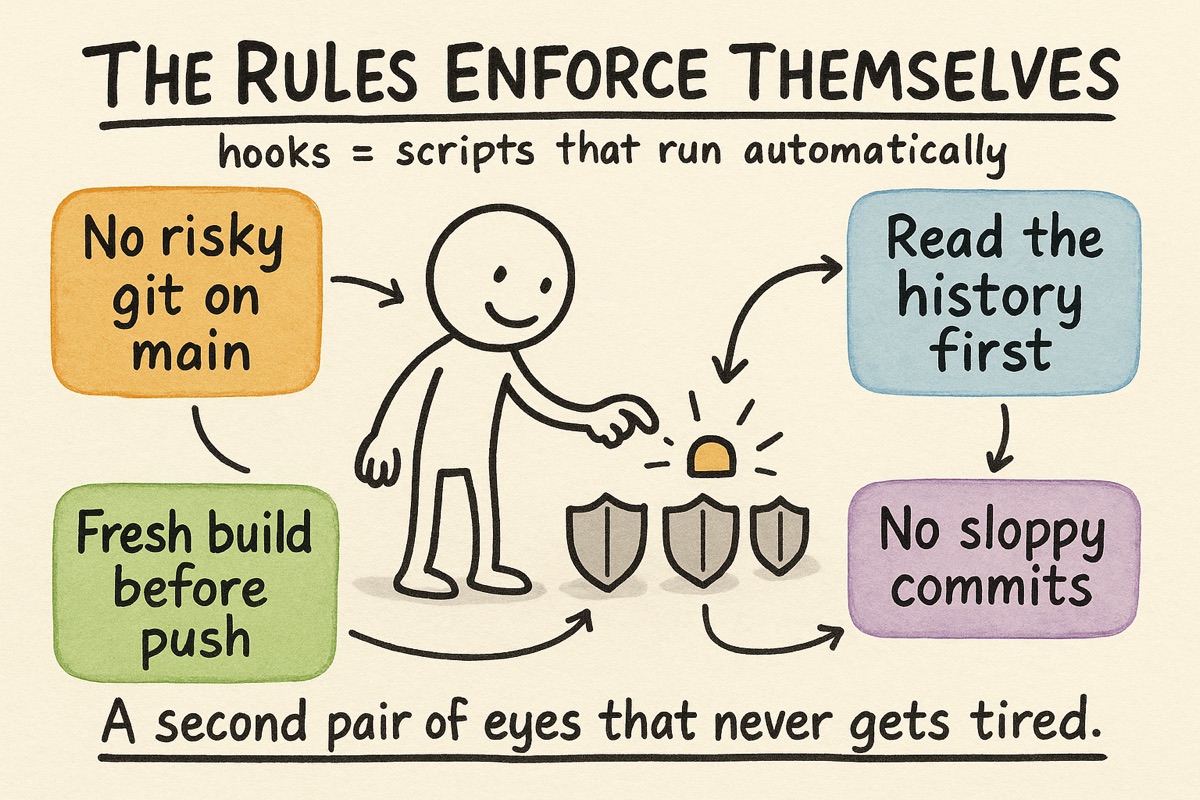
Here is the biggest addition since the last post, and the one I am most glad I made.
Writing rules down is not the same as following them. I would write a good rule, mean it, and then break it myself three days later when I was tired and moving fast. A rule that lives only in a document is a suggestion.
So now the important rules enforce themselves. Claude Code lets you run hooks: small scripts that fire automatically at certain moments, like just before a file is edited or a command runs, and that can stop the action if something is wrong. I have around two dozen of them. They turned my rules from polite suggestions into guardrails. Roughly, they fall into four groups.
Safety. These stop the genuinely dangerous moves. One blocks risky git operations on my main branch, so I cannot accidentally rewrite history or strand work in progress. Another blocks edits to ship-critical files when I am on the wrong branch. A third refuses sloppy commits that would skip my own checks.
Process. These make me do the homework before I act. Before I touch a tracked issue, one hook forces me to actually read its prior context and history first, so I do not re-solve something already decided. Another will not let me start planning in a part of the codebase until I have read the relevant knowledge file for that area. Discipline I would otherwise skip, made non-optional.
Anti-debt. One watches how I push code: it checks that the build is fresh and caps how many times I can push in a session, which kills the bad habit of using continuous integration as a remote debugger. Push, fail, push again is expensive and lazy, and the hook simply will not allow it.
Housekeeping. Smaller ones auto-format code on save, keep my knowledge files from getting bloated, load the right context when a session starts, and nudge me to fetch current documentation instead of trusting stale memory.
Why this matters: as a solo developer, there is no second person to catch you. The hooks are that second person. They do not get tired, and they do not make exceptions because it is late.
The workflow: four comprehensive phases
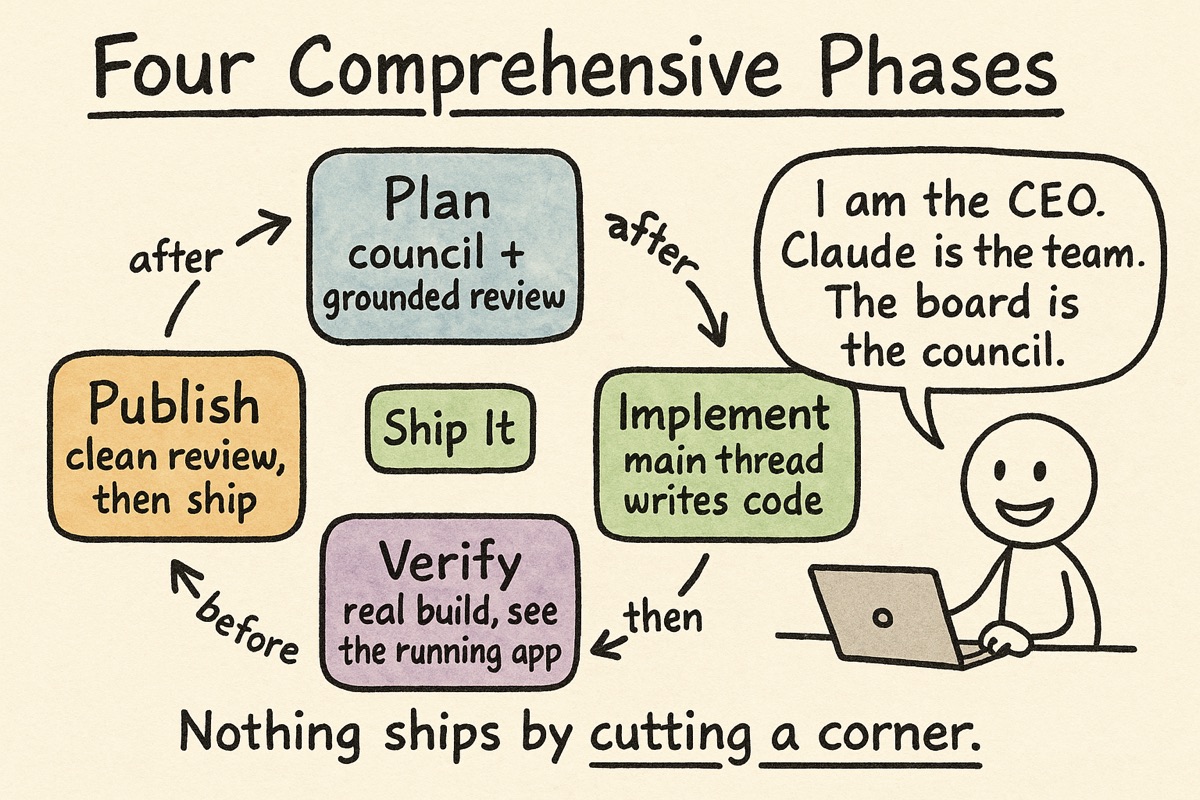
The original post described a five-step “ship-it loop.” That loop grew up into four phases, and the word I would use for each now is comprehensive. Nothing ships by cutting a corner.
1. Plan, comprehensively. Before any code is written, the change gets a real written plan. Then two kinds of review. First, a coverage review from a council of two different AI models (I use one from OpenAI and one from Google), asked a single blunt question: what did we forget? The premise, the placement, the edge cases, how we will validate it. Then a grounded review, where a separate model actually reads my real code and fact-checks the plan against it, line by line, until it stops finding problems. Only then do I approve the plan. This phase alone has saved me from more expensive rewrites than I can count.
2. Implement, comprehensively. The code gets written, with tests alongside it, following consistent conventions. One important change from the last post, which I will come back to: I write the code on the main thread now, rather than handing it to agents.
3. Verify, comprehensively. Not a quick debug build. A full release build, bundled into the real app, relaunched fresh. Then automated checks, plus a verification step that uses the macOS accessibility APIs to inspect the actual running app and confirm the change does what a user would see, not just what the logs claim. Bugs hide in release mode that never show up in debug, so I test the real thing every time.
4. Publish, comprehensively. A final review reads the actual code change against the approved plan and keeps going until it is clean, all of it on my machine, before anything leaves it. Then branch, pull request, continuous integration, merge, and confirm the main branch is healthy.
The mental model I gave last time still holds, with one update. I am the CEO. Claude is the engineering team. And the board of advisors, which used to be a single model I would run plans past, is now that council of two plus the grounded code reviewer. More eyes, earlier, before mistakes get expensive.
GitHub is the tracker (and why I left Beads)
Every piece of work I do is a GitHub issue. Features, bugs, research, follow-ups. The plan lives in the issue, the discussion lives in the issue, and the history stays there long after I have forgotten the details. It survives across sessions, which is the entire point of a tracker.
I did not start there. In the original post my tracker was a dedicated tool called Beads. It was capable, but it cost more than it gave back for a team of one. It ran its own database server that I had to keep alive. It kept its own store of notes that competed with my knowledge base, so I was effectively maintaining memory in two places. And its best features, the rich dependency graphs between tasks, solve a coordination problem that teams have and a solo developer simply does not.
So I migrated everything to GitHub Issues. One place. No server to babysit. Native to where the code already lives. It was a meaningfully cleaner home for tracking what I do and what is left to do, and I have not missed Beads once.
The lesson that reshaped everything: memory versus a knowledge base
This is the one I think about most.
Early on I leaned heavily on Claude’s built-in memory. By the last post I had saved 88 of them, little lessons like “this build works in debug but fails in release.” It felt like progress.
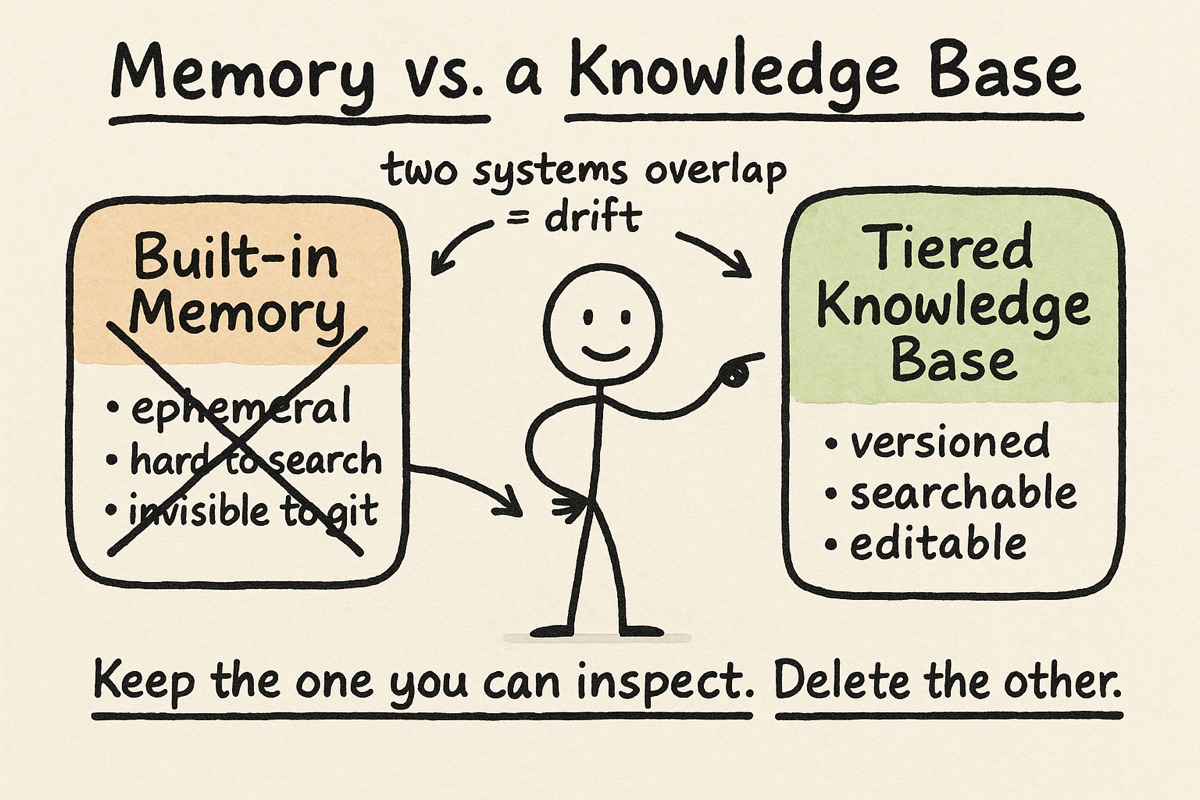
But over time I realized the memory store and my tiered knowledge base were doing the same job, and they were quietly fighting each other. The memory store was the weaker of the two: ephemeral, loosely structured, hard to search, and invisible to version control. My knowledge files were the opposite, plain text I could read, search, edit, diff, and review like any other part of the project. Keeping both meant every lesson had two possible homes, and I could never quite trust which one was current.
So I retired the built-in memory entirely. Now every durable lesson lands in a versioned knowledge or rule file, and anything about the live state of a task lands in its GitHub issue. Nothing learned is lost. It just lives somewhere I can actually find it, trust it, and change it.
The deeper lesson, the one that applies well beyond memory: when two systems overlap, you do not get redundancy, you get drift. Pick the one you can inspect, and delete the other.
The other thing I got wrong: agents writing code
The last post had specialist agents implementing features: an audio agent for the audio code, a build agent for compilation, and so on. It was a nice idea and I was proud of it.
At my codebase’s scale, it stopped working. Agent-written code would pass the early checks and then fail in subtle ways downstream, the kind of failure that is expensive precisely because it looks fine at first. So I flipped the rule. The main thread writes all the code now. Agents are still useful, but read-only: they research, they scan the codebase, they review a change. They never write it. The agent count actually dropped, from a dozen to five, and the work got more reliable, not less.
I am including this because it is tempting to read a setup like mine as a finished blueprint. It is not. It is a record of what survived contact with real work, and some of my favorite ideas did not.
The rules I still build by
A few simple rules carry most of the weight, and these held up unchanged:
- Heart and limbs. The core feature must always work. Everything else can fail gracefully without taking the main experience down. For a dictation app, the path from pressing the button to text appearing is the heart. The nice extras are limbs. A limb can fail and you still get your text.
- DRY. Every fact lives in exactly one place. Reference it, do not copy it. Duplication is how things drift, which is the same lesson the memory store taught me the hard way.
- Validate, do not assume. Run the command, read the file, test the path before you claim it works. The rule I still break most when I am rushing.
- Branch before building. Never change code directly on main. A clean undo button is worth the extra step.
- Hypothesis first. When something breaks, form a theory and design a test before you start changing things. It saves hours of chasing the wrong problem.
- Ship the real thing. Always test the real release build, not the convenient debug one.
They are not complex. They are just consistent, and now, with hooks, several of them are enforced whether I feel like it or not.
Wrapping up
If there is a throughline from the first post to this one, it is that you do not design this system upfront. You grow it. You start with a brain, a tracker, and a loop, and then every time something surprises you, you write it down. When a note keeps mattering, it becomes a knowledge file. When a knowledge file becomes something Claude should never violate, it becomes a rule, and then a hook enforces it. The structure emerges from the bottom up, out of real work, not from a diagram.
The honest part is that growing it also means pruning it. I dropped a tracker, a memory system, and a whole way of using agents, and the setup is better for all three. If you take one thing from this update, let it be that: be as willing to delete a part of your system as you were to add it.
I would genuinely love to hear what is working for you. We are all still figuring this out together.
Curious about EnviousWispr, the free, private, on-device dictation app that Claude and I build together? See how it works or browse comparisons against other Mac dictation tools.